Messages, reports & licence
SMS and WhatsApp
Setting up the SMS gateway and WhatsApp, the automatic messages (welcome, receipts, renewal reminders, class bookings), the message log, sending a message by hand and WhatsApp click-to-chat
Who it is for:OwnerManager
On this page
GymDesk can text members on its own: a welcome when they join, a receipt after each payment, a reminder before the membership ends, and class booking news. It also sends portal PINs. Every message is kept in a log, and any message can be forwarded through WhatsApp with one tap.
Setting up the SMS gateway
Only the owner can do this, under Integrations: "SMS gateway, WhatsApp and connected systems."
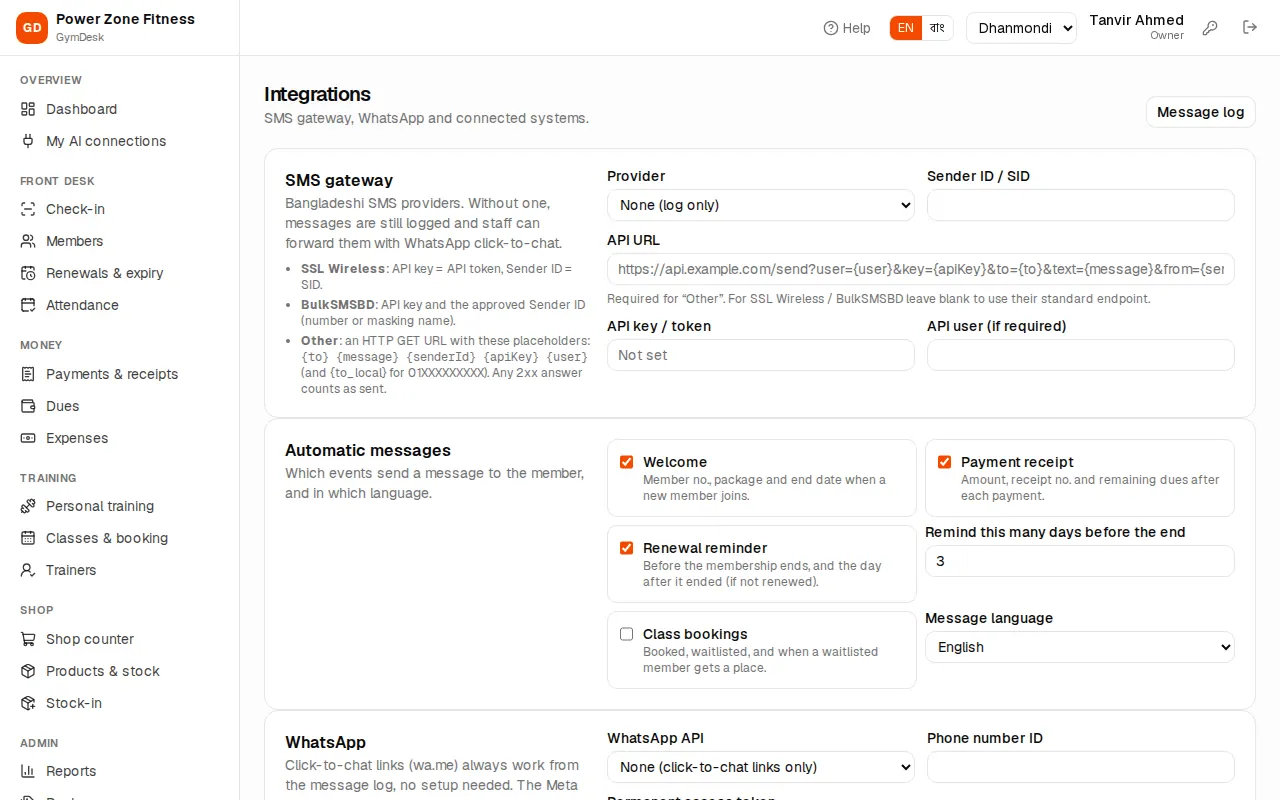
- Buy an SMS package from a Bangladeshi provider and ask for an API key and an approved Sender ID (a number or a masking name such as "POWERZONE").
- In SMS gateway pick the Provider: SSL Wireless (SMS Plus), BulkSMSBD, or Other (HTTP GET URL) for any other provider.
- Fill Sender ID / SID and API key / token (and API user if your provider needs one). For SSL Wireless the API key is the API token and the Sender ID is the SID. For "Other" paste the provider's API URL with the placeholders shown on the page.
- Press Save messaging settings.
- Press Send a test: it "checks the saved gateway settings end to end and shows the provider's answer."
Saved keys are shown only as "•••••••• (last 4)" — leave the box blank to keep the saved key, or tick Remove the saved key.
Without a gateway (None (log only)) messages are still written to the log and staff can forward them with WhatsApp click-to-chat.
Automatic messages
On the same page, under Automatic messages, tick which events send a message:
- Welcome — member no., package and end date when a new member joins.
- Payment receipt — amount, receipt no. and remaining dues after each payment.
- Renewal reminder — before the membership ends, and the day after it ended (if not renewed). Set Remind this many days before the end.
- Class bookings — booked, waitlisted, and when a waitlisted member gets a place.
Message language: English, or বাংলা. A Bangla SMS holds 70 characters per part instead of 160, so it costs more parts.
Save with Save messaging settings.
"Click-to-chat links (wa.me) always work from the message log, no setup needed." They open WhatsApp on the staff member's phone or computer with the text filled in; staff press send.
To send automatically through WhatsApp, pick WhatsApp Cloud API (Meta) under WhatsApp API and enter the Phone number ID and Permanent access token from Meta. Meta only delivers free text inside 24 hours of the person's last message — otherwise it needs an approved template, so failures will show in the log.
The message log
SMS & WhatsApp (manager and owner): "Every message the gym sends — welcome, receipts, renewal reminders, class bookings and manual messages."
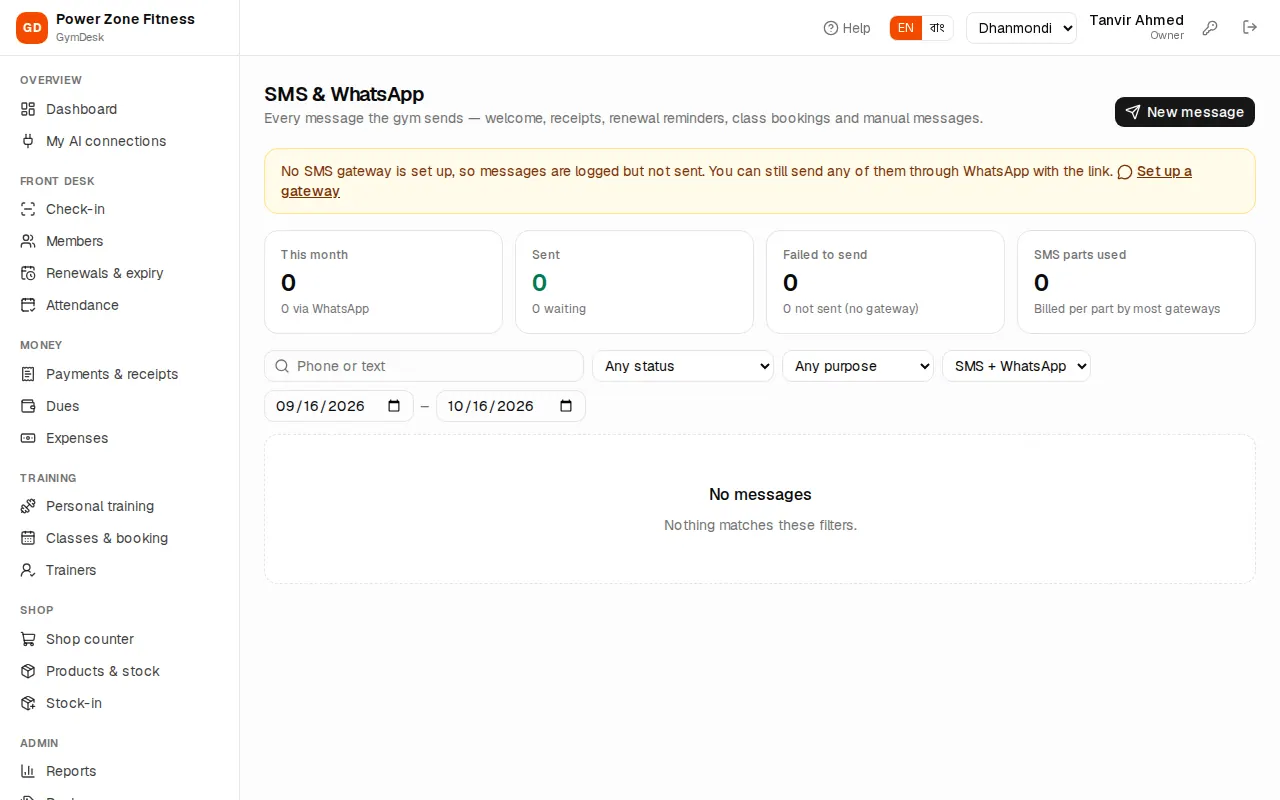
- This month: messages Sent (and via WhatsApp), Failed to send, waiting or not sent because there is no gateway, and SMS parts used — most gateways bill per part.
- Filters: phone or text, Any status, Any purpose (welcome, payment receipt, renewal reminder, class booking, manual …), channel and dates.
- Each row: when, who it was sent to (with a link to the member), the message with its SMS parts, the status and the number of attempts.
- The WhatsApp button opens WhatsApp with the same text — handy when the SMS failed or there is no gateway.
- Failed messages are retried by themselves; Retry now tries again at once.
If no gateway is set up the page says so at the top, with Set up a gateway for the owner.
Sending a message by hand
- On SMS & WhatsApp press New message.
- Pick a Member, or Any number and type the Mobile number.
- Type the Message in English or Bangla. Below it you see the characters and SMS parts.
- Press Send — or Open in WhatsApp to send it from WhatsApp on this device instead (no API needed).
"Message sent" means the gateway took it; "Logged, but no gateway is configured" means it is only in the log.